
Download WordPress.com Chrome App – Blogging, Website Builder, Content Management
Overview
The WordPress.com Chrome app is a streamlined desktop tool designed to simplify the process of blogging and content publishing for users across all experience levels. Built to integrate seamlessly with the Chrome browser, it provides quick access to core WordPress.com functionalities directly from the new tab page. The app enables users to start writing, manage their blogs, or explore curated content without navigating through a full website interface. It is ideal for content creators, small business owners, educators, and individuals who want to share their thoughts, showcase creative work, or maintain a professional online presence.
With a focus on speed and accessibility, the app supports real-time publishing and content discovery, making it suitable for both casual bloggers and those managing active online platforms. The tool is particularly effective for users who rely on frequent content updates or want to stay connected with a vibrant online community. While the developer did not provide additional details about the app’s development background, its integration with WordPress.com—known for hosting millions of websites—suggests a robust foundation for content creation and management. Real-world use cases include launching a personal journal, promoting a local business, or sharing multimedia content such as photos and music through a dedicated blog.
Key Features & Capabilities
- Quick Access to Blogging Tools – The app places a dedicated button on the Chrome new tab page, allowing users to launch their blog editor instantly. This feature reduces the time between idea and publication, ideal for spontaneous content creation.
- Integrated Blog Reader – Users can access their personal Reader and browse curated content through Freshly Pressed, a daily selection of high-quality posts from the WordPress.com community.
- Theme and Design Customization – With over 150 customizable themes and a library of fonts, users can tailor their site’s appearance to match their personal brand or creative vision.
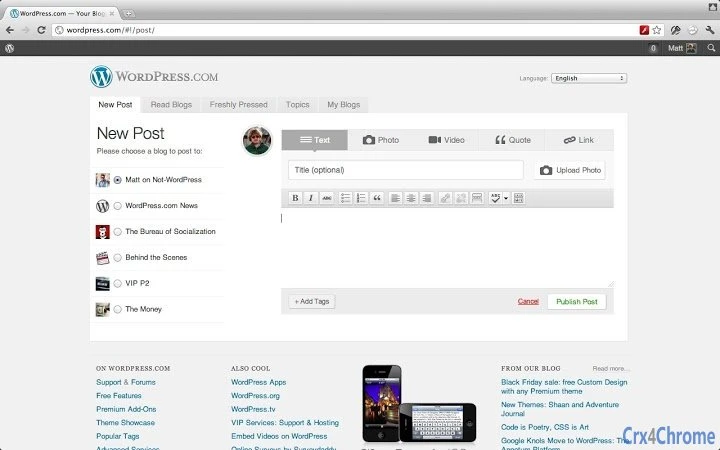
- Easy Content Publishing – The interface supports text, image, and multimedia uploads, enabling users to publish rich content directly from the app.
- Site Statistics Dashboard – Built-in analytics provide insights into visitor numbers, popular posts, and engagement metrics, helping users track the success of their content over time.
These features are designed to support users in creating, managing, and growing their digital presence with minimal friction. For example, a photographer can quickly publish a new gallery post with a few clicks, while a small business owner can update their website with promotions or event announcements. The app’s lightweight nature ensures that these capabilities remain accessible without requiring extensive technical knowledge.
User Interface, Workflow & Performance
The user interface of the WordPress.com Chrome app is clean, minimal, and intuitive, reflecting the broader design philosophy of the WordPress ecosystem. Navigation is streamlined through a single button on the new tab page, which opens the blog editor or Reader interface. The layout prioritizes content creation, with essential tools grouped logically and clearly labeled. This structure supports efficient workflows, especially for users who value speed and simplicity.
Workflow efficiency is enhanced by the app’s ability to maintain context across sessions—users can resume writing drafts or continue browsing their Reader without re-entering login details. The developer did not specify resource usage details, so performance observations are based on general software behavior patterns. However, the app’s small file size of 12.4 MB suggests it is optimized for low memory and CPU consumption, making it suitable for use on a wide range of devices.
Stability appears to be consistent with the broader WordPress.com platform, which is known for reliable uptime and consistent updates. No specific issues with crashes or freezes were reported in the available information. Users can expect a stable experience during regular content creation and browsing tasks.
Compatibility & System Requirements
The WordPress.com Chrome app is compatible with both Windows and Mac operating systems, ensuring broad accessibility for desktop users. It is designed specifically for the Chrome browser, meaning it requires Chrome to be installed and running on the host machine. The app version is 1.0.0, with a file size of 12.4 MB, indicating a lightweight installation that won’t significantly impact disk space.
Exact system requirements were not listed. Platform compatibility information is limited to the supported operating systems and the browser dependency. Users should ensure their device meets the minimum requirements for running Chrome, as the app relies on the browser’s underlying engine for functionality. No additional hardware specifications were provided.
Pros and Cons
Pros
- Instant access to blogging and content management via the Chrome new tab page
- Lightweight design with minimal disk space usage (12.4 MB)
- Integration with a large, active online community and curated content
- Over 150 customizable themes and fonts for unique site design
- Free to download and use with no hidden costs
Cons
- Requires Chrome browser to function, limiting use on non-Chrome platforms
- No standalone desktop application; fully dependent on browser environment
- Exact performance and system requirements were not specified
- Limited offline functionality; online connectivity required for full features
- App updates are managed through Chrome Web Store, which may delay access to new versions
FAQ Section
Is the WordPress.com Chrome app free to use?
Yes, the app is available at no cost. It is designed as a free tool to support content creation and community engagement on the WordPress.com platform.
Can I use the app without a WordPress.com account?
No, a WordPress.com account is required to access the app’s core features, including publishing content and using the Reader.
Does the app work on mobile devices?
The app is designed for desktop use within the Chrome browser and is not available as a standalone mobile application. However, WordPress.com offers mobile apps for iOS and Android for similar functionality.
Is the app secure to install?
Yes, the app is distributed through the official Chrome Web Store and is verified by Google. It adheres to Chrome’s security policies and does not require elevated permissions.
How often does the app receive updates?
Updates are managed through the Chrome Web Store and are typically released automatically when new versions are available. The app’s version is 1.0.0, and future updates will be delivered via the same channel.
Final Thoughts + CTA
The WordPress.com Chrome app delivers a focused, efficient experience for users who prioritize speed and simplicity in content creation. Its seamless integration with the Chrome browser, combined with powerful publishing tools and access to a vast online community, makes it a compelling choice for bloggers, creators, and small business owners. While it is limited to Chrome and requires an internet connection, its lightweight design and free access make it accessible to a wide audience.
For individuals seeking a no-frills way to start blogging or stay updated with curated content, this app offers a streamlined solution. It’s especially valuable for those who want to publish frequently or explore creative expression through digital storytelling. With its clean interface and strong community support, the app stands out as a practical tool in the digital publishing landscape.
Download WordPress.com Chrome App now







